



Mini PC for Gaming: Architecture, Performance Limits, and Hardware Selection Guide
Mini PCs are compact computers designed to deliver desktop-level functionality in a much smaller form factor. Thanks to modern processors, integrated graphics, and high-speed NVMe storage, many Mini PCs can now handle workloads such as software development, media streaming, virtualization, and even gaming.
However, their small size introduces engineering trade-offs involving thermal limits, GPU performance, memory bandwidth, and upgrade flexibility.
This article explains the internal architecture of Mini PCs, how they compare to desktops and laptops, and how well they perform in gaming and emulator environments. It also discusses the hardware requirements for AAA gaming and how to select the right Mini PC based on real performance factors rather than marketing specifications.
Table of Contents
- 1. What Is a Mini PC
- 2. Internal Hardware Architecture of Mini PCs
- 3. Mini PC vs Desktop vs Laptop
- 4. Gaming Performance Characteristics
- 5. Hardware Requirements for Game Emulation
- 6. Why Mini PCs Work Well for Retro Gaming
- 7. Running AAA Games on Mini PCs
- 8. Choosing the Right Mini PC for Gaming
- 9. FAQ
- 10. Conclusion
1. What Is a Mini PC
A Mini PC is a compact desktop computer that integrates essential computing hardware inside a small chassis. Despite its reduced physical size, it still includes all critical subsystems found in traditional computers:
- CPU (Central Processing Unit)
- GPU (Graphics Processing Unit)
- RAM (Memory)
- Storage devices
- Input/output ports
Unlike laptops, Mini PCs do not include built-in displays or keyboards. Users connect external peripherals such as monitors, keyboards, mice, or game controllers.
Typical use cases include:
- office computing
- media streaming
- edge computing
- development environments
- home servers
- gaming and emulation
Their compact design allows them to be mounted behind monitors using VESA mounts, creating a clean workspace with minimal cable clutter.
Figure 1. Mini PC Internal Hardware Structure

2. Internal Hardware Architecture of Mini PCs
Mini PCs use highly integrated motherboard designs that maximize computing performance within strict thermal and spatial limits.
CPU Integration
Most Mini PCs use mobile-class processors derived from laptop platforms.
Common processor families include:
- Intel Core i5 / i7 mobile series
- AMD Ryzen 5 / Ryzen 7 mobile series
- Intel N-series low-power processors
- AMD Ryzen U-series processors
These processors integrate several subsystems directly on the chip:
- memory controller
- integrated GPU
- media encode/decode engines
- AI acceleration units
This system-on-chip architecture reduces motherboard complexity and power consumption.
Integrated Graphics (iGPU)
Most Mini PCs rely on integrated GPUs built into the processor.
Examples include:
- Intel Iris Xe
- Intel UHD Graphics
- AMD Radeon 680M
- AMD Radeon 780M
AMD’s modern RDNA-based integrated GPUs can deliver surprisingly strong gaming performance, often capable of running modern titles at 1080p medium settings.
However, integrated GPUs share system memory with the CPU, which introduces memory bandwidth limitations compared with dedicated graphics cards.
Memory Architecture
Mini PCs typically use SO-DIMM DDR4 or DDR5 memory modules.
Recommended configurations:
| RAM Capacity | Typical Usage |
|---|---|
| 8 GB | Basic computing and office work |
| 16 GB | Gaming and multitasking |
| 32 GB | Development, virtualization, and heavy workloads |
Dual-channel memory configurations significantly improve integrated GPU performance.
Storage Subsystems
Most modern Mini PCs support high-speed storage technologies such as:
- NVMe PCIe SSD
- SATA SSD
- secondary storage drives
NVMe drives provide extremely fast read/write speeds, improving game load times, emulator performance, and system responsiveness.
3. Mini PC vs Desktop vs Laptop
Mini PCs occupy a middle ground between full desktop computers and laptops.
| Feature | Mini PC | Desktop PC | Laptop |
|---|---|---|---|
| Size | Very compact | Large tower | Portable |
| Upgradeability | Limited | Extensive | Limited |
| Graphics capability | Mostly integrated GPU | Dedicated GPU support | Mobile GPU |
| Power consumption | Low | High | Medium |
| Mobility | Semi-portable | Stationary | Highly portable |
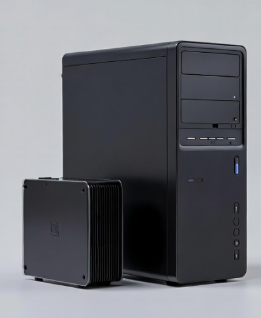
Desktop systems still dominate when maximum gaming performance is required because they support full-size GPUs and larger cooling systems.
Figure 2. Mini PC vs Desktop System Size Comparison
4. Gaming Performance Characteristics
Gaming performance on a Mini PC depends primarily on four factors.
CPU Performance
Modern games require strong CPUs for:
- physics simulation
- AI logic
- world simulation
- background tasks
Processors with higher core counts and clock speeds improve frame stability.
GPU Capability
The GPU performs rendering operations such as:
- texture mapping
- lighting calculations
- shader processing
- post-processing effects
Integrated GPUs can handle:
- esports titles
- indie games
- older AAA games
More demanding titles require stronger graphics hardware.
Thermal Design
Cooling is one of the biggest engineering constraints in Mini PCs.
Common cooling methods include:
- heat pipes
- blower-style fans
- vapor chamber cooling
Insufficient cooling can cause thermal throttling, reducing CPU and GPU clock speeds during gaming sessions.
Memory Bandwidth
Integrated GPUs depend heavily on RAM bandwidth.
| Memory Speed | Gaming Performance Impact |
|---|---|
| DDR4-2400 | Lower frame rates |
| DDR5-5600 | Higher frame rates |
5. Hardware Requirements for Game Emulation
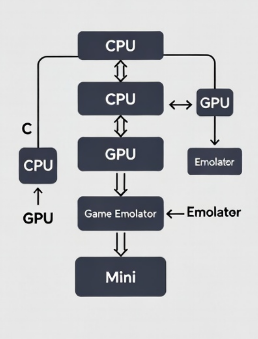
Game emulation recreates the behavior of older gaming consoles through software.
Instead of running native instructions, the emulator must translate the original console architecture into instructions the PC can execute.
Key hardware requirements include:
CPU
The CPU performs most of the instruction translation and system simulation.
More powerful CPUs allow emulation of complex consoles such as:
- PlayStation 3
- Nintendo Switch
- Xbox 360
GPU
Modern emulators also use GPU acceleration for rendering pipelines.
Storage
Large ROM libraries benefit from fast storage systems.
Figure 3. Game Emulator Processing Architecture
6. Why Mini PCs Work Well for Retro Gaming
Mini PCs are popular platforms for retro gaming setups.
Reasons include:
- compact size
- low power consumption
- adequate CPU performance
- easy controller connectivity
Many enthusiasts build living-room retro gaming systems using Mini PCs connected directly to televisions.
Popular emulator platforms include:
- RetroArch
- Dolphin Emulator
- PCSX2
- RPCS3
These software platforms allow classic consoles to run on modern hardware.
7. Running AAA Games on Mini PCs
Modern AAA games require significantly more computing resources.
Typical minimum configuration:
| Component | Recommended Specification |
|---|---|
| CPU | Intel Core i7 or AMD Ryzen 7 |
| GPU | Dedicated GPU or high-end integrated GPU |
| RAM | 16 GB |
| Storage | NVMe SSD |
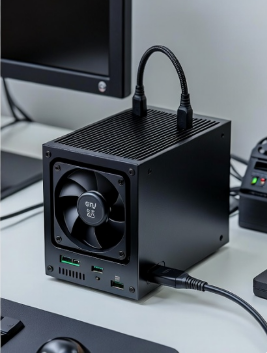
Some Mini PCs support external GPUs (eGPU) through Thunderbolt or USB4 connections, allowing desktop-class graphics performance.
Figure 4. Mini PC External GPU Gaming Setup
8. Choosing the Right Mini PC for Gaming
When selecting a gaming Mini PC, focus on hardware specifications that directly impact performance.
Choose a Powerful CPU
Recommended options include:
- AMD Ryzen 7 7840HS
- Intel Core i7 mobile processors
Evaluate GPU Performance
For gaming, prioritize:
- AMD RDNA integrated graphics
- systems with external GPU support
Install Sufficient RAM
Minimum for gaming:
16 GB RAM
Recommended for heavy workloads:
32 GB RAM
Verify Cooling Design
Look for systems with:
- dual-fan cooling
- larger heat pipes
- efficient airflow
These prevent thermal throttling during long gaming sessions.
9. FAQ
Are Mini PCs good for gaming?
Yes. Many modern Mini PCs can run esports titles and older AAA games smoothly when equipped with strong CPUs and integrated graphics.
Can Mini PCs run AAA games?
Some high-performance Mini PCs can run AAA games at medium settings, especially those using modern integrated GPUs or external GPUs.
Are Mini PCs good for emulation?
Yes. Mini PCs are widely used for emulating classic gaming consoles because they offer sufficient CPU power in a compact system.
Do Mini PCs support external GPUs?
Some models support Thunderbolt or USB4, allowing connection to external GPU enclosures.
10. Conclusion
Mini PCs have evolved into capable compact computers that combine energy efficiency, modern processors, and fast storage technologies.
While they cannot completely replace high-end gaming desktops, many Mini PCs provide strong performance for casual gaming, emulator platforms, and even moderate AAA gaming workloads.
For users who want a small, efficient computer that saves desk space while still delivering reliable performance, a well-configured Mini PC can be an excellent solution.