



Understanding VRAM: Architecture, Working Principles, Types, and Performance Impact
Video Random Access Memory (VRAM) is a specialized high-bandwidth memory subsystem used by graphics processors to store and process rendering data.
Modern GPU vendors such as :contentReference[oaicite:0]{index=0} and :contentReference[oaicite:1]{index=1} design VRAM architectures to support workloads including real-time rendering, ray tracing, and AI acceleration.
VRAM is optimized for massively parallel memory access, enabling high-resolution graphics processing, shader computation, and frame buffering.
::contentReference[oaicite:2]{index=2}
Table of Contents
- 1. What Is VRAM
- 2. How VRAM Works in the Graphics Pipeline
- 3. VRAM Architecture and Memory Interface
- 4. Types of VRAM Technologies
- 5. VRAM vs System RAM
- 6. Key Factors Affecting VRAM Performance
- 7. Major Applications of VRAM
- 8. Advantages and Limitations of VRAM
- 9. How Much VRAM Do You Actually Need
- 10. How to Check VRAM on a Computer
- 11. Improving or Upgrading VRAM Performance
- 12. Common VRAM Problems
- 13. FAQ
- 14. Conclusion
1. What Is VRAM
VRAM (Video Random Access Memory) is a dedicated memory subsystem designed for graphics workloads.
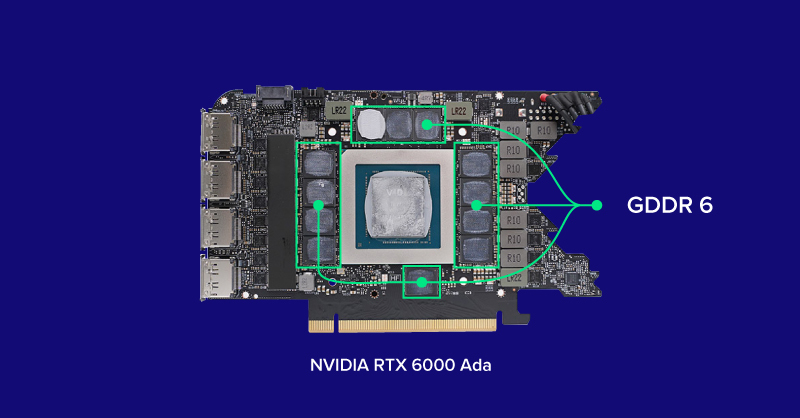
Unlike system RAM, VRAM is physically integrated into the graphics card and connected to the GPU through high-speed memory channels.
VRAM is optimized for:
- Massive parallel memory access
- Large sequential data streaming
- Predictable access latency
- High throughput rendering operations
Typical stored rendering assets include:
- Texture maps
- Vertex buffers
- Shader programs
- Frame buffers
- Depth and stencil buffers
- Lighting coefficients
The GPU repeatedly reads and writes these memory regions during rendering cycles.
2. How VRAM Works in the Graphics Pipeline
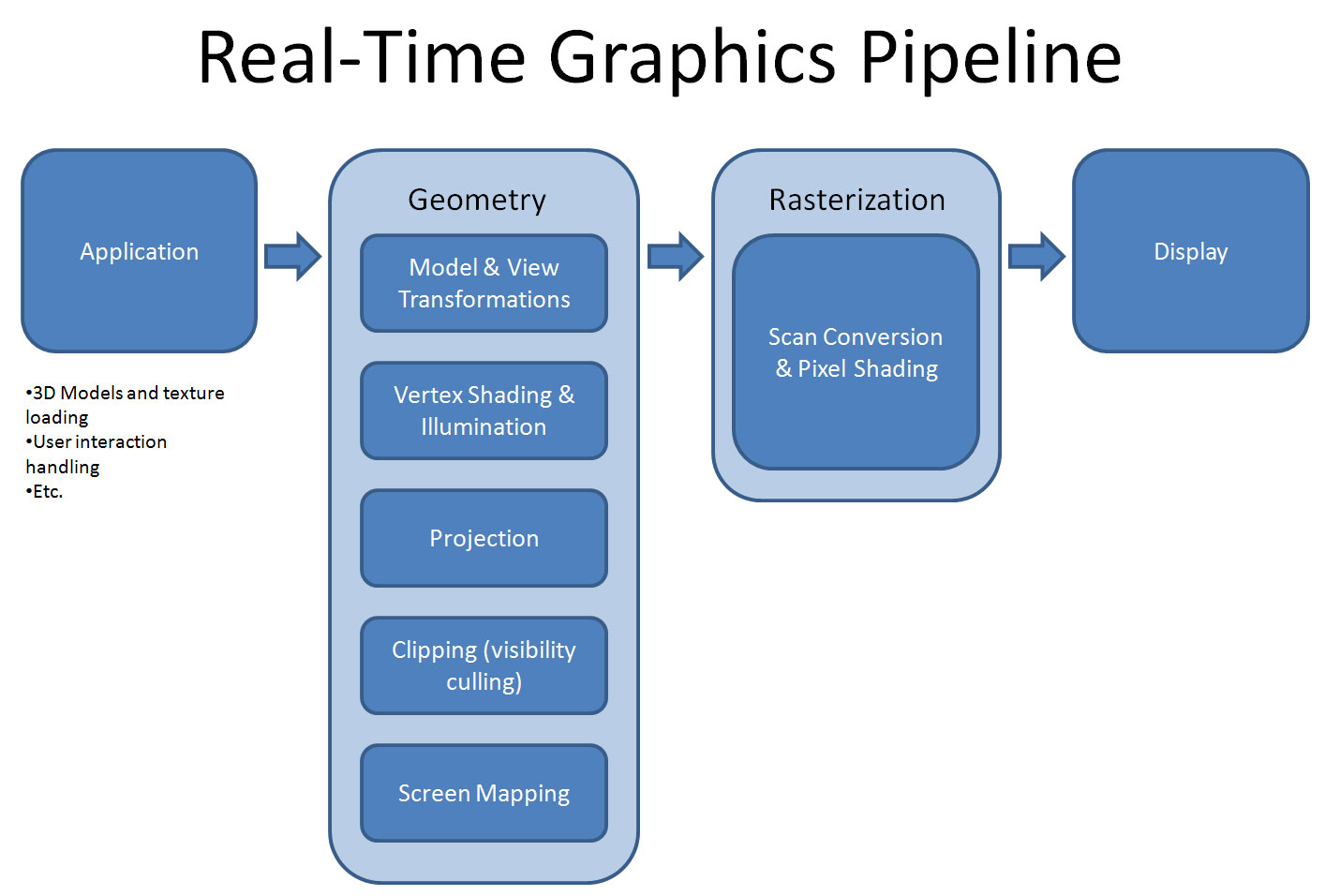
Modern GPU rendering follows a structured pipeline.
Pipeline Stages
1. Asset Loading Stage
Textures and geometry models are transferred from storage → system RAM → VRAM.
2. Geometry Processing Stage
Vertex shaders transform 3D object coordinates.
3. Rasterization Stage
Geometric primitives are converted into pixel fragments.
4. Fragment Shading Stage
Shader programs sample textures and compute lighting models.
5. Frame Buffer Output Stage
Final pixel data is written into VRAM frame buffers.
If VRAM capacity is exceeded, memory paging may occur through PCIe links, causing severe performance degradation.
::contentReference[oaicite:3]{index=3}
3. VRAM Architecture and Memory Interface
VRAM is designed for high parallelism.
Memory Controllers
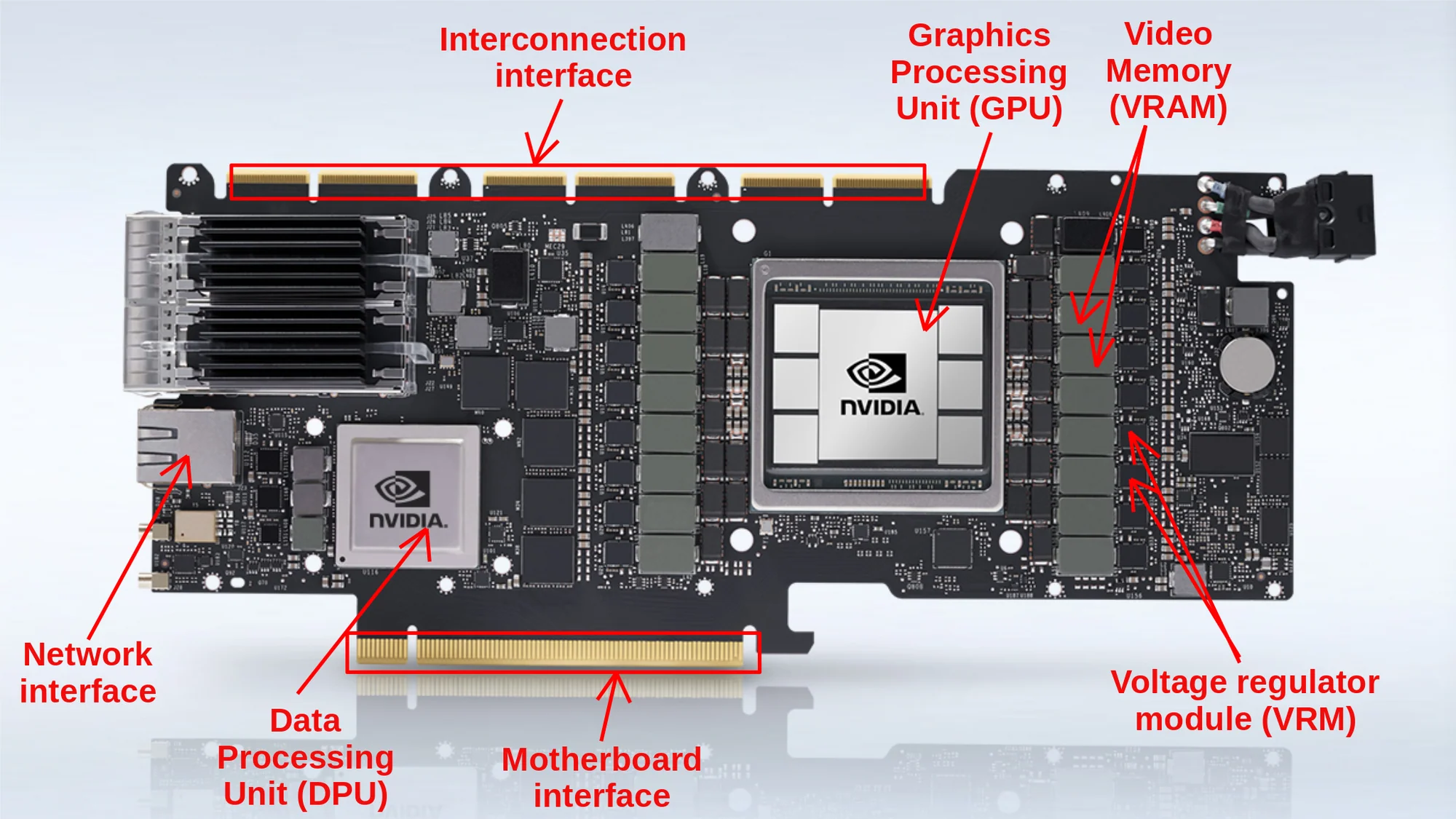
Memory controllers manage data flow between GPU cores and VRAM banks.
Memory Bus Width
| GPU Class | Memory Bus Width |
|---|---|
| Entry-level GPUs | 64–128 bit |
| Mid-range GPUs | 192–256 bit |
| High-end GPUs | 320–512 bit |
Bandwidth Relationship
[ Bandwidth = Memory\ Clock \times Bus\ Width \times Transfer\ Efficiency ]
4. Types of VRAM Technologies
MDRAM (Multibank DRAM)
- Multiple independent memory banks
- Parallel read/write operations
WRAM (Window RAM)
- Dual-port architecture
- Simultaneous access capability
SGRAM (Synchronous Graphics RAM)
- Clock synchronized memory transactions
- Graphics-specific optimization
GDDR Series
| Type | Typical Bandwidth |
|---|---|
| GDDR5 | ~224 GB/s |
| GDDR6 | ~512 GB/s |
| GDDR6X | ~1 TB/s |
HBM (High Bandwidth Memory)
HBM stacks multiple DRAM dies vertically using TSV interconnect technology.
::contentReference[oaicite:4]{index=4}

5. VRAM vs System RAM
| Feature | VRAM | System RAM |
|---|---|---|
| Main Purpose | Graphics Processing | General Computing |
| Processor | GPU | CPU |
| Optimization Goal | High Bandwidth | Low Latency |
| Physical Location | Graphics Card | Motherboard |
| Typical Types | GDDR6, HBM | DDR4, DDR5 |
6. Key Factors Affecting VRAM Performance
Memory Bandwidth
Bandwidth determines data transfer speed.
[ Bandwidth = Memory\ Speed \times Memory\ Bus\ Width ]
VRAM Capacity Requirements
| Resolution | Typical VRAM Requirement |
|---|---|
| 1080p Gaming | 4–6 GB |
| 1440p Gaming | 8 GB |
| 4K Gaming | 10–16 GB |
Memory Bus Width
Wider buses increase aggregate throughput.
Memory Clock Frequency
Higher frequency improves effective bandwidth.
GPU Compression Algorithms
Modern GPUs use lossless or near-lossless compression to reduce memory traffic.
7. Major Applications of VRAM
VRAM is widely used in:
- Real-time gaming rendering
- 3D animation production
- Video post-processing
- Machine learning inference
- Scientific simulation visualization
- CAD engineering modeling
8. Advantages and Limitations of VRAM
Advantages
- Extremely high parallel throughput
- Optimized graphics workload execution
- Supports ultra-high-resolution rendering
Limitations
- High manufacturing cost
- Cannot be upgraded independently
- Performance depends on GPU microarchitecture
9. How Much VRAM Do You Actually Need
| Use Case | Recommended VRAM |
|---|---|
| Office Work | 2–4 GB |
| Casual Gaming | 4–6 GB |
| AAA Gaming | 8–12 GB |
| Professional Rendering | 12–16 GB |
| AI Training Workloads | 16–48 GB |
10. How to Check VRAM on a Computer
Windows System Path
Settings → System → Display → Advanced Display Settings
Task Manager Method
Ctrl + Shift + Esc → Performance → GPU
Monitoring Software
- GPU-Z
- MSI Afterburner
11. Improving or Upgrading VRAM Performance
VRAM modules are typically soldered onto GPU PCBs.
Performance tuning methods include:
- GPU upgrade
- Lowering rendering resolution
- Updating driver firmware
- Closing background GPU workloads
12. Common VRAM Problems
Typical symptoms of VRAM bottlenecks include:
- Texture pop-in artifacts
- Frame stuttering
- Rendering crash events
- Shader memory overflow
These occur when memory bandwidth or capacity is insufficient.
13. FAQ
Is more VRAM always better?
Not necessarily. GPU compute architecture and memory bandwidth are often more important.
Can VRAM be upgraded?
No. VRAM is integrated into the graphics card package.
Does VRAM affect FPS?
Yes. Insufficient VRAM causes pipeline stalls and texture streaming delays.
Why do AI models require large VRAM?
Neural networks store parameters and intermediate tensors during training and inference.
14. Conclusion
VRAM is a critical component of modern GPU systems.
Future graphics computing trends—such as ray tracing, neural rendering, and AI-assisted graphics—will continue increasing demand for high-bandwidth memory architectures.
Advances in 3D-stacked memory and interconnect technologies are expected to further improve GPU memory efficiency.