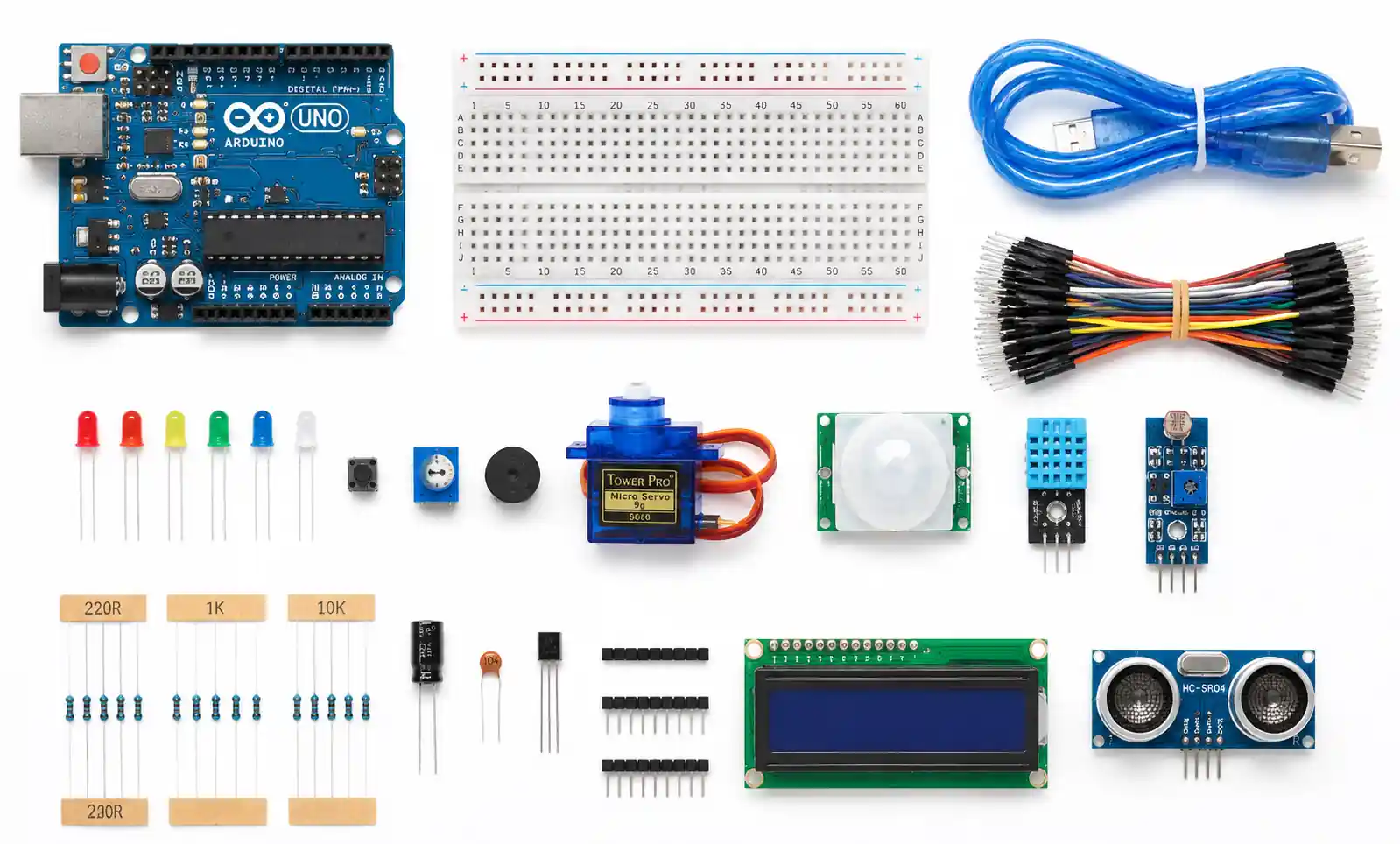



Arduino UNO Development Board: Complete Selection Guide (2026)
The Arduino UNO is the world's most widely adopted microcontroller development board, with over 10 million units deployed across industrial automation, IoT, robotics, and education. This guide helps engineers, educators, and technical buyers evaluate the UNO against project requirements—covering specifications, performance comparisons, design considerations, and sourcing factors.
Table of Contents
- Arduino UNO Technical Specifications
- How to Select the Right Board for Your Project
- Performance Comparison: UNO vs Alternatives
- Design Considerations and Common Mistakes
- Supply Chain and Sourcing Factors
- FAQ
- Conclusion
1. Arduino UNO Technical Specifications
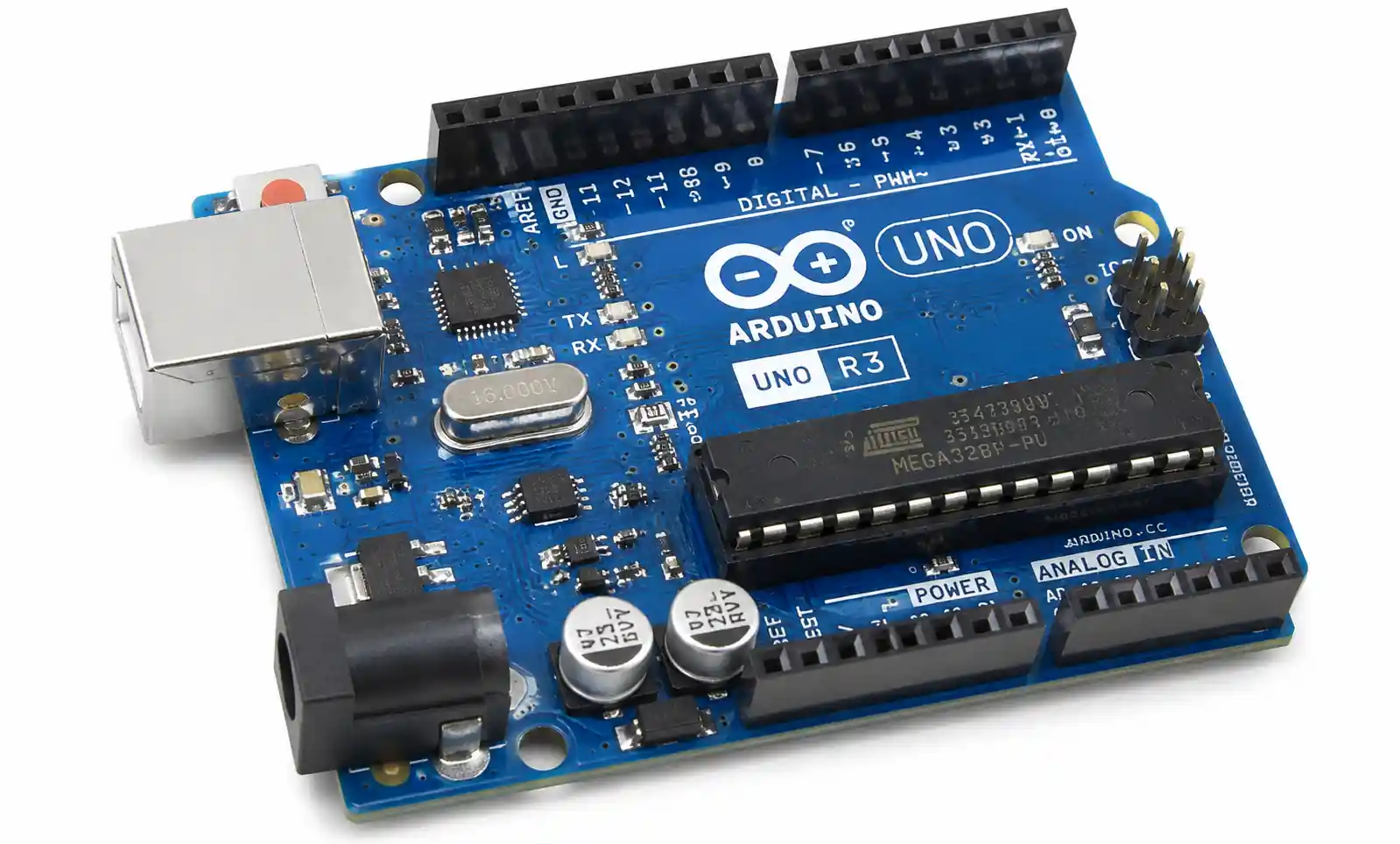
The Arduino UNO R3 is built around the ATmega328P microcontroller running at 16 MHz, delivering approximately 16 MIPS.
Core Specifications:
| Parameter | Specification | Practical Impact |
|---|---|---|
| Flash Memory | 32 KB (0.5 KB bootloader) | Program storage, ~30 KB usable |
| SRAM | 2 KB | Limited for complex data processing |
| EEPROM | 1 KB | Non-volatile storage for settings |
| Clock Speed | 16 MHz | ~16 MIPS, handles 1 kHz sensor polling |
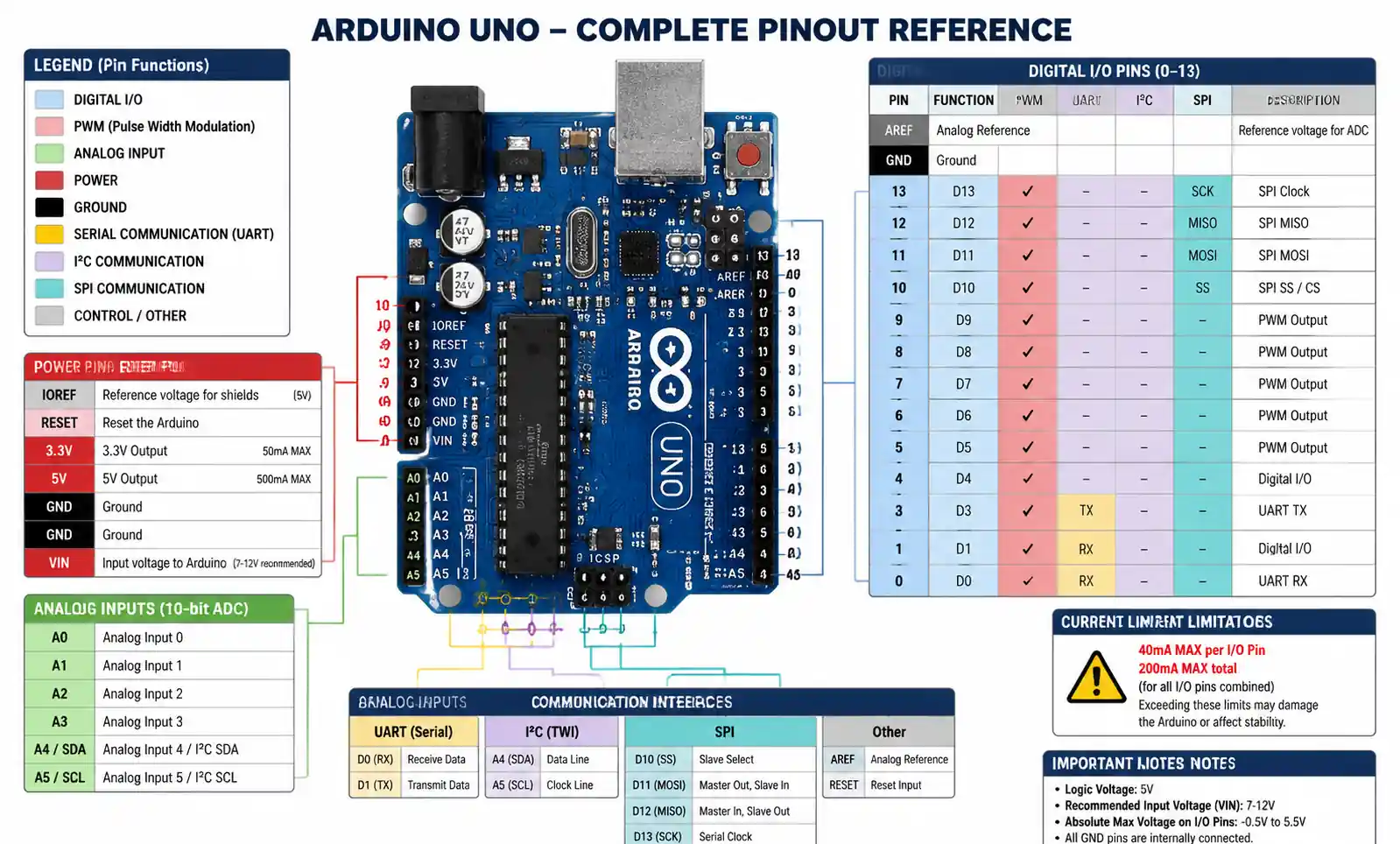
| Digital I/O Pins | 14 (6 PWM) | 40 mA max per pin, 200 mA total |
| Analog Inputs | 6 (10-bit ADC) | 4.9 mV resolution at 5V reference |
| Serial | UART, I2C, SPI | 300 baud to 2 Mbps, I2C up to 400 kHz |
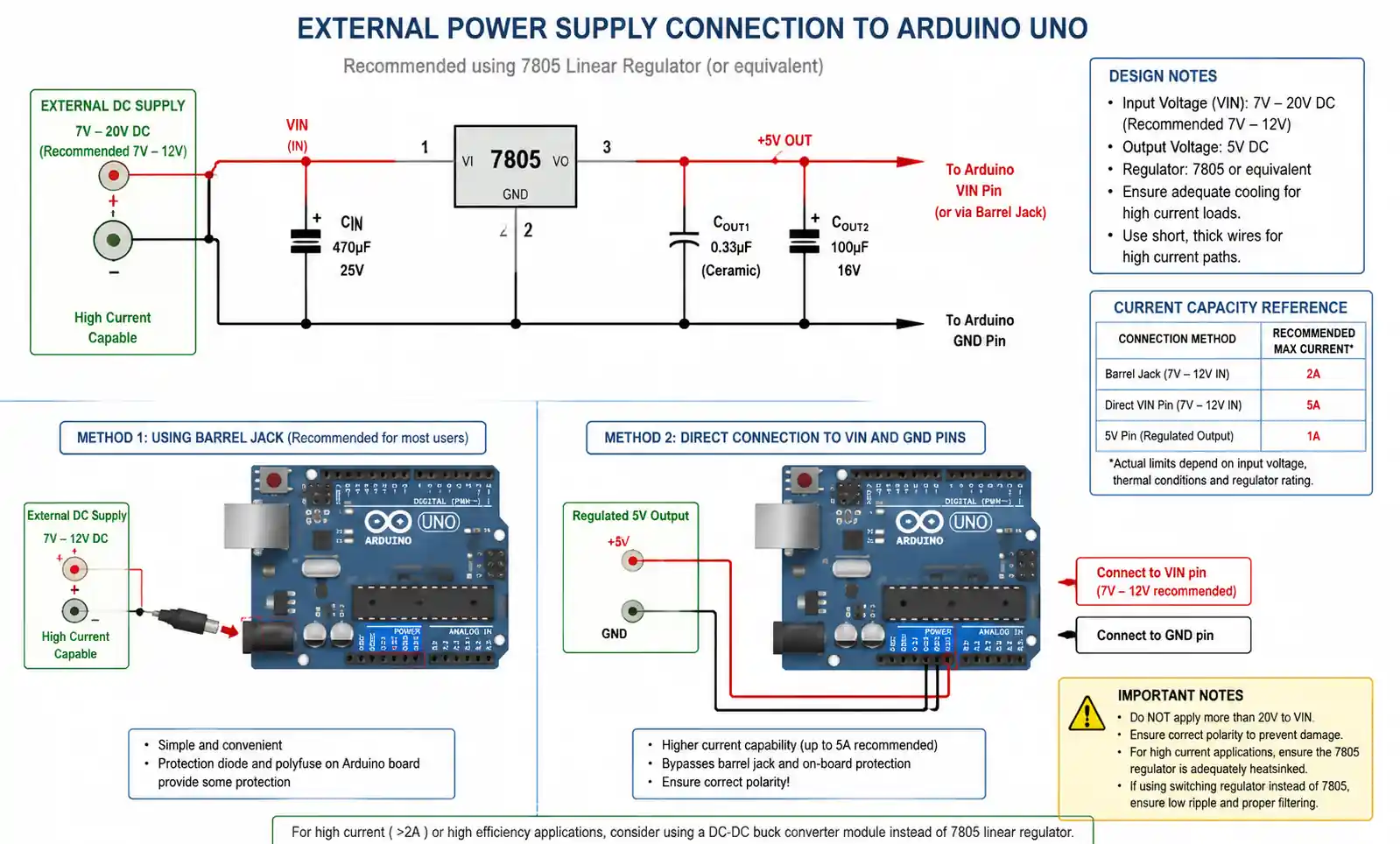
| Input Voltage | 7-12V (barrel jack) | 9V recommended for regulator efficiency |
Power Supply Limits:
- Barrel jack: ~800 mA available for external circuits
- USB power: ~500 mA (limited by USB spec)
- 5V pin total load capacity: ~800 mA (derate with ambient temperature)
- For loads >500 mA sustained, use external regulated 5V supply
2. How to Select the Right Board for Your Project
Processing & Memory:
- UNO's 2 KB SRAM suits simple control logic, moderate sensor polling, and basic communication
- Exceed this with >6 analog sensors, Kalman filtering, FFT, or lookup tables >1 KB → consider Arduino Mega 2560 (8 KB SRAM) or ARM Cortex-M platforms
I/O Pin Count:
- Count required pins + 20% headroom
- I2C consumes 2 digital pins
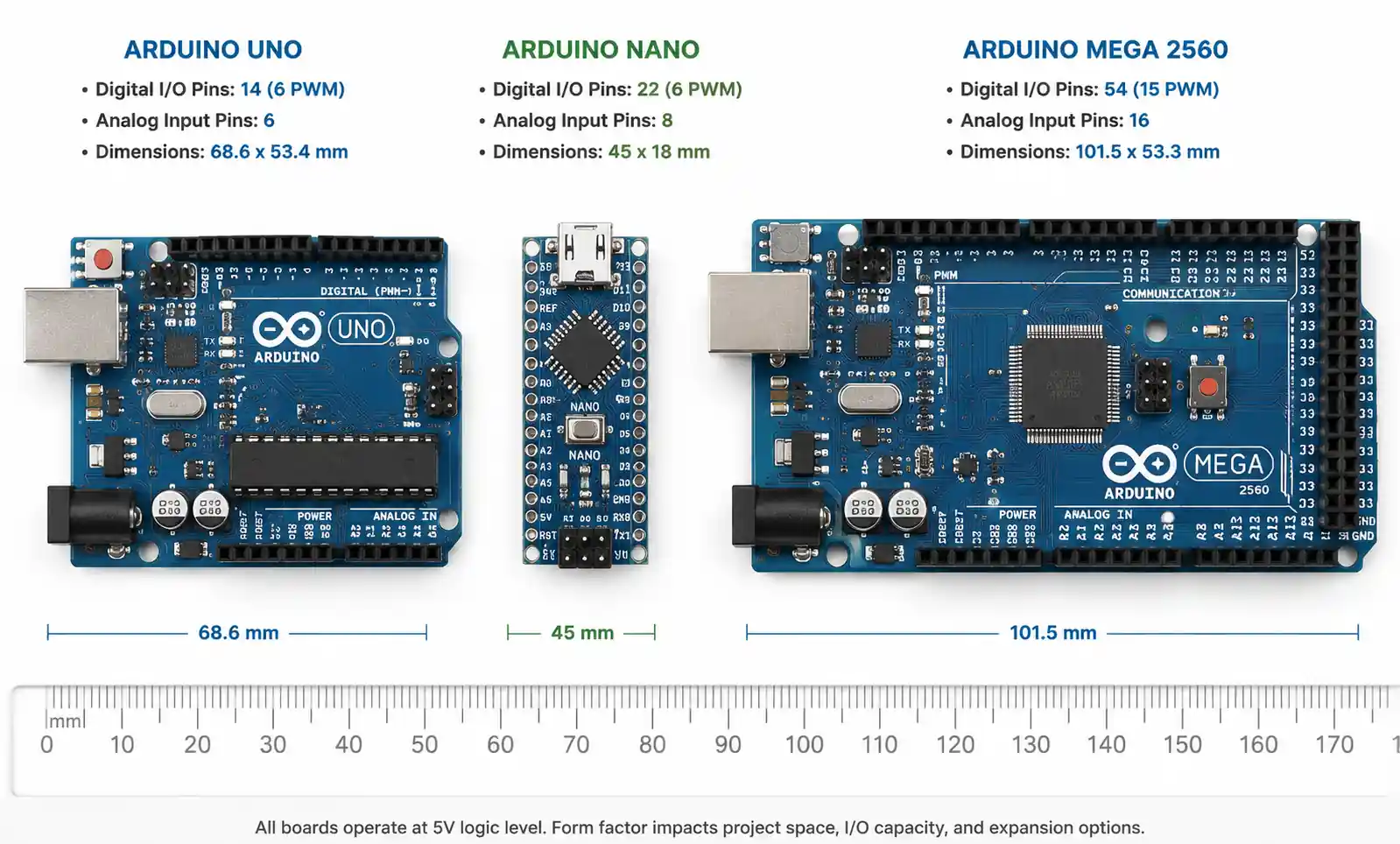
- Need >14 digital pins? → Mega 2560 (54 digital, 16 analog) or I2C port expanders (MCP23017 adds 16 pins per chip)
Real-Time Performance:
- Interrupt response: <10 µs
- PWM frequencies: 490 Hz (pins 5,6) or 980 Hz (pins 3,9,10,11)
- Need sub-µs timing, >10 kHz PWM, or deterministic scheduling? → Arduino Due (84 MHz ARM) or RTOS-capable platforms
Development Ecosystem:
- UNO has the largest library ecosystem—thousands of verified libraries for sensors, actuators, and protocols
- Verify library availability for specialized components before committing
3. Performance Comparison: UNO vs Alternatives
| Platform | Clock | Flash | SRAM | Digital I/O | Analog In | Price | Best For |
|---|---|---|---|---|---|---|---|
| Arduino UNO R3 | 16 MHz | 32 KB | 2 KB | 14 (6 PWM) | 6 (10-bit) | $25-30 | General prototyping, education |
| Arduino Nano | 16 MHz | 32 KB | 2 KB | 14 (6 PWM) | 8 (10-bit) | $20-25 | Space-constrained, breadboards |
| Arduino Mega 2560 | 16 MHz | 256 KB | 8 KB | 54 (15 PWM) | 16 (10-bit) | $40-50 | High I/O count, complex projects |
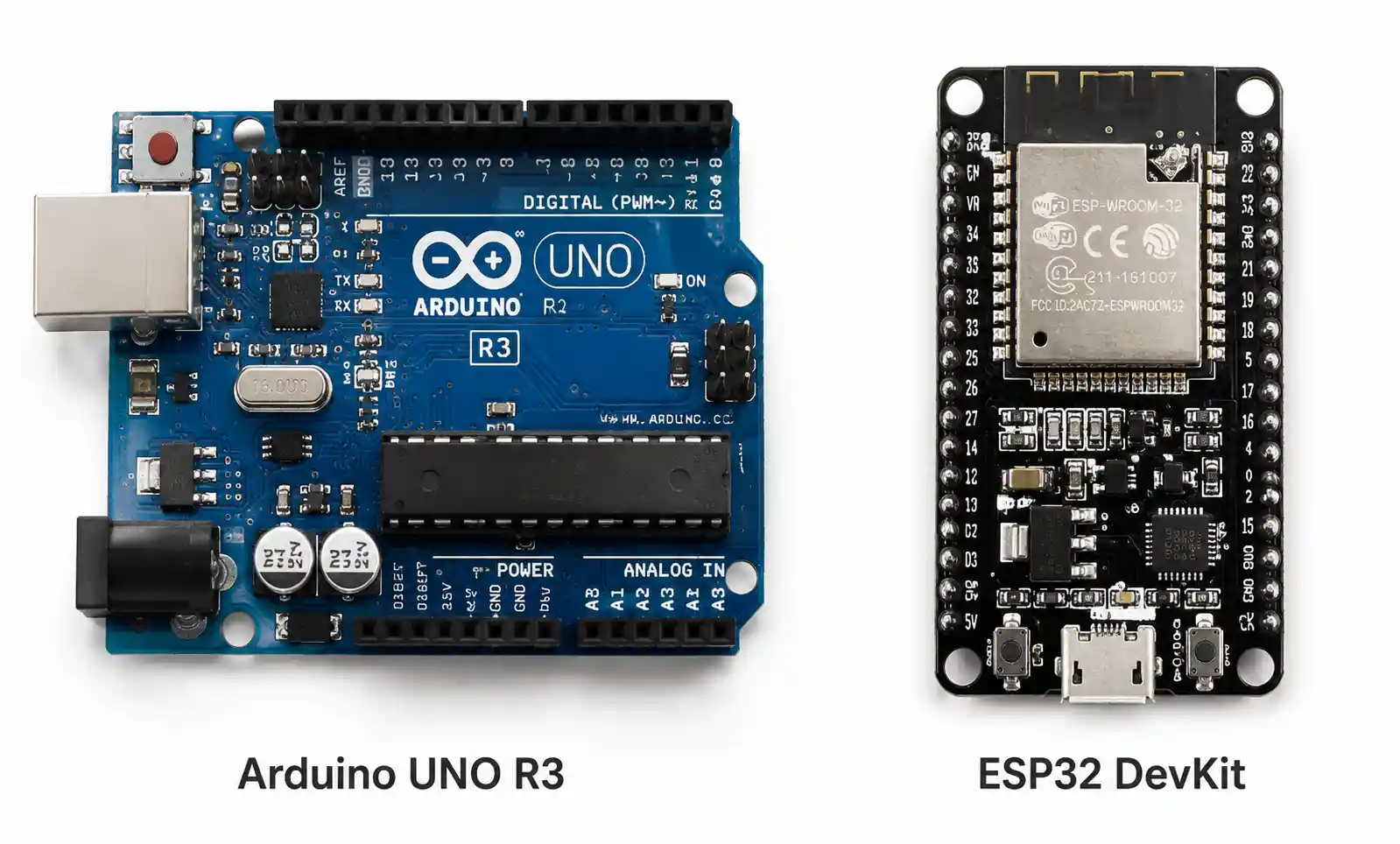
| ESP32 DevKit | 240 MHz | 4 MB | 520 KB | 34 | 18 (12-bit) | $8-15 | WiFi/Bluetooth, high-performance |
| Raspberry Pi Pico | 133 MHz | 2 MB | 264 KB | 26 | 3 (12-bit) | $4-6 | Cost-sensitive, modern ARM |
Decision Matrix:
| Application | Recommended | Reason |
|---|---|---|
| Education (50+ units) | UNO compatible | Proven ecosystem, lowest learning curve |
| >8 analog sensors | Mega 2560 | Native I/O avoids multiplexer complexity |
| Wireless IoT | ESP32 DevKit | Integrated WiFi/BT saves $15-25 per unit |
| Space-constrained | Arduino Nano | Same capability in 45×18 mm |
| >1 kHz data acquisition | Teensy 4.0 or STM32 | ATmega328P sampling bottleneck |
| Production >1000 units/year | Custom ATmega328P PCB | Per-unit cost drops to $3-5 |
4. Design Considerations and Common Mistakes
Power Supply Errors (Most Common):
- UNO's 5V pin supplies ~800 mA max via barrel jack
- Multiple servos/LEDs can draw >1.5A → voltage sag <4.7V triggers brownout
- Calculate worst-case current + 30% margin; use external supply for loads >500 mA
Analog Input Mistakes:
- Default 5V reference → 4.9 mV per step
- For better resolution, use AREF pin with external reference (down to 1.1V → ~1 mV/step)
- Always call
analogReference(EXTERNAL)in setup before reading - Allow 100-200 ms settling time after switching reference modes
I2C Bus Issues:
- Requires 4.7 kΩ pull-ups on SDA/SCL
- Multiple modules with onboard pull-ups → effective resistance <2 kΩ → signal distortion
- Measure total pull-up resistance; remove redundant resistors to maintain 3-5 kΩ
Interrupt Handling:
- Hardware interrupts on pins 2 and 3 only
- ISRs must complete in <10-20 µs
- Never use Serial.print(), delay(), or complex calculations in ISRs → set flags only
Memory Management:
- 2 KB SRAM limits String objects and dynamic allocation
- Use char arrays instead of String
- Use F() macro for string literals (stores in flash, not SRAM)
- Monitor free memory with MemoryFree library
| Common Mistake | Symptom | Solution |
|---|---|---|
| Insufficient power supply | Random resets, erratic servos | External 5V supply rated 2× peak current |
| Missing I2C pull-ups | Intermittent sensor failures | Add 4.7 kΩ on SDA/SCL |
| Exceeding 40 mA per pin | Pin damage, logic level issues | Use transistor drivers |
| Blocking code in ISRs | Timing errors, instability | Keep ISRs <10 µs, set flags only |
| String object fragmentation | Crashes after hours of operation | Use char arrays and F() macro |
5. Supply Chain and Sourcing Factors
Authentic vs Compatible:
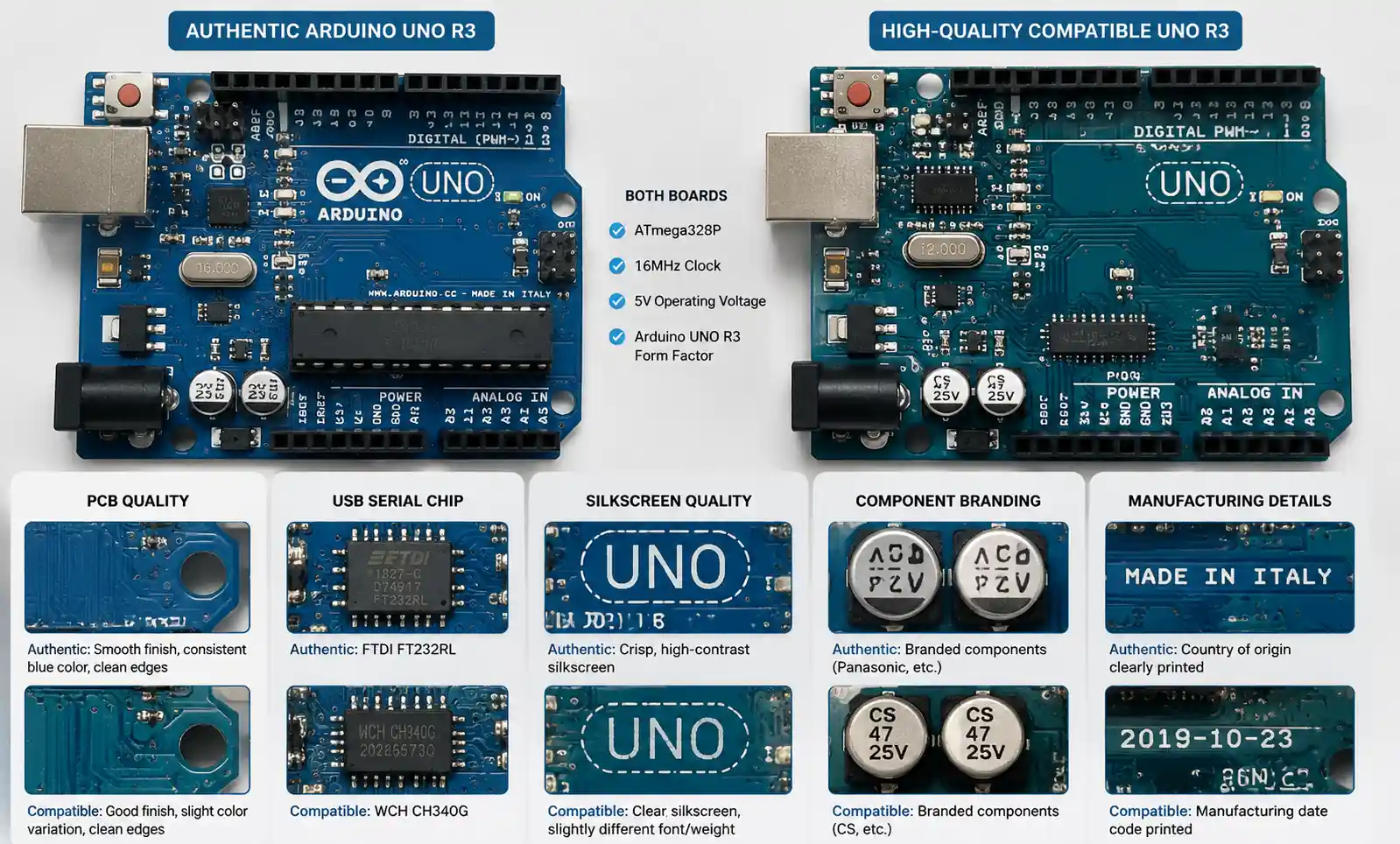
- Authentic UNO ($25-30): Italian-made, CE/FCC certified, documented QA, traceable components
- Compatible ($8-15): Chinese-made, identical ATmega328P, quality varies (CH340G vs FTDI, regulator performance, PCB tolerances)
- Production/regulated applications → authentic boards for traceability
- Education/high-volume → compatible boards acceptable (2-3% failure rate manageable)
Bulk Pricing:
- Authentic: 15-20% discount at 100 units, 25-30% at 500 units
- Compatible: MOQ 50-100 units, 40-50% savings at volume
- Include shipping, customs, and replacement costs in TCO
Lead Times:
- Authentic via distributors (Digi-Key, Mouser, SparkFun): <1 week stock, 2-4 weeks backorder
- Compatible overseas: 3-6 weeks including shipping
- For time-critical projects, local stock outweighs per-unit savings
Long-Term Stability:
- UNO R3 design stable since 2011 → backward compatibility
- ATmega328P in active production with no announced obsolescence
- For 5-10 year lifecycles, verify availability and maintain spare inventory
6. Frequently Asked Questions
What's the difference between UNO R3 and earlier revisions?
R3 (2011) added SDA/SCL pins near AREF, improved USB chip (ATmega16U2), and stronger RESET circuit. All shields and code remain compatible. Always specify R3 for new purchases.
Can UNO run RTOS applications?
2 KB SRAM severely limits RTOS. Lightweight schedulers exist, but complex multitasking needs ARM Cortex-M platforms (64+ KB SRAM). If you need >3-4 concurrent tasks or deterministic preemption, migrate to RTOS-capable hardware.
How do I calculate power supply capacity?
Sum all loads: UNO (~50 mA), LEDs (15-20 mA each), sensors (5-50 mA each), servos (200-500 mA each under load), communication modules (ESP8266: 80-170 mA peak). Multiply total by 1.3-1.5. For >500 mA, use external regulated 5V supply.
Can UNO operate in industrial temperatures (-40°C to +85°C)?
ATmega328P is rated for -40°C to +85°C, but standard UNO boards use 0°C to +70°C components. For industrial temperature, design custom PCBs with industrial-grade components or use Arduino Industrial 101. Exposing standard UNO to <0°C or >70°C causes regulator failure, frequency drift, and component damage.
What testing should I do before production?
- Worst-case power consumption under peak load
- 48-72 hour continuous operation (memory leaks, thermal issues)
- I/O stress testing with all peripherals active
- EMI testing in target environment Document all conditions and results before scaling.
7. Conclusion
The Arduino UNO remains the reference platform for embedded prototyping and education—not because it offers the highest performance, but because its ecosystem maturity, extensive library support, and stable hardware design reduce development risk and accelerate time-to-market.
Choose UNO when:
- Your application requires moderate I/O (≤14 digital, ≤6 analog)
- Memory needs fit within 2 KB SRAM and 32 KB flash
- Development speed and ecosystem support outweigh raw performance
- Deployment scale is educational (50+ units) or low-volume production (<500 units/year)